Hello, I will be covering my personal approach to Lab 1-1 of Practical Malware Analysis Lab. You can find the book below:
 Michael Sikorski (Author), Andrew Honig (Author) Format: Paperback
How these write up are structured is that I provide my approach on how I solved the question. At the end, I reflect on my answer by checking the answer on the back of the book. Due to me having respect to the author, I will not provide the author answer to the question - you can probably find the answer from another source.
Let's get into it.
Questions 1: Upload the files to Virus Total, and view the reports. Does either file match any existing antivirus signatures?
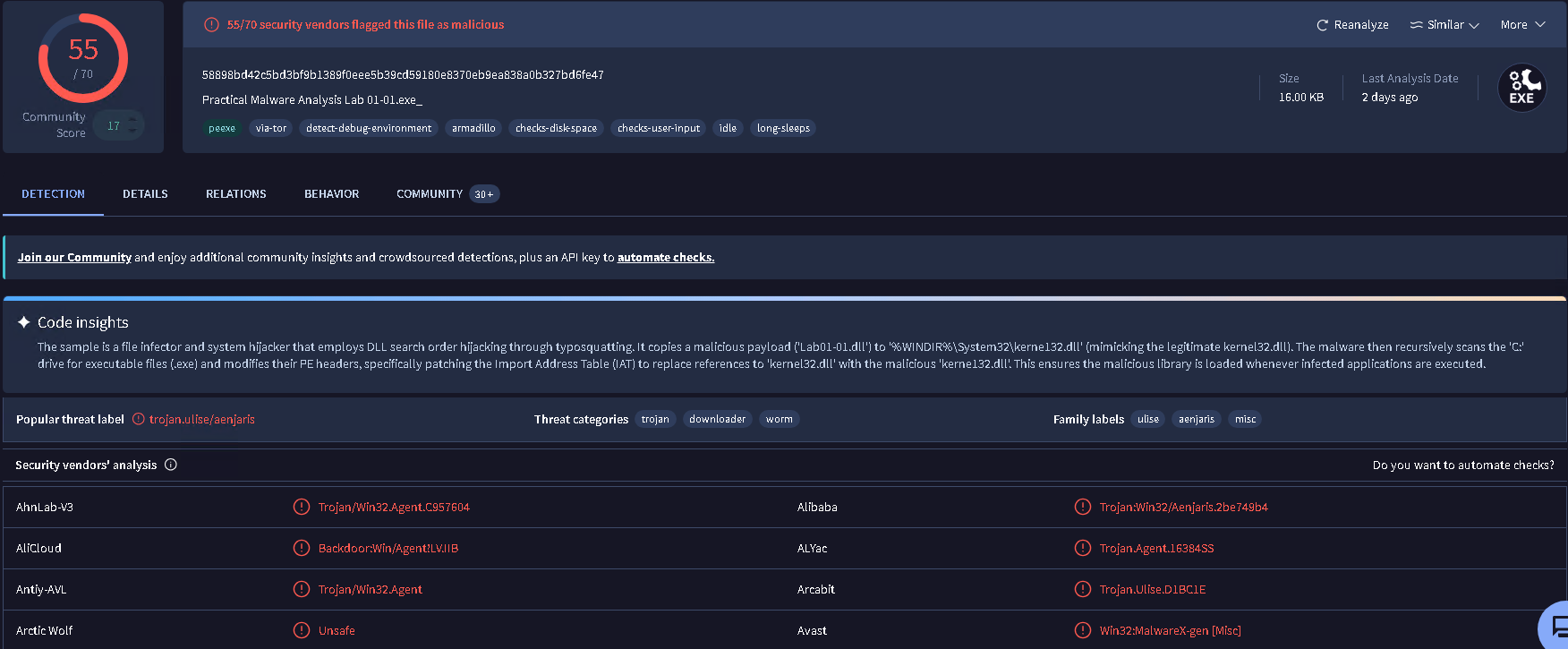
As instructed, I upload lab1_1.exe to VT and the popular signatures that was found was trojan[.]ulise/aenjaris.
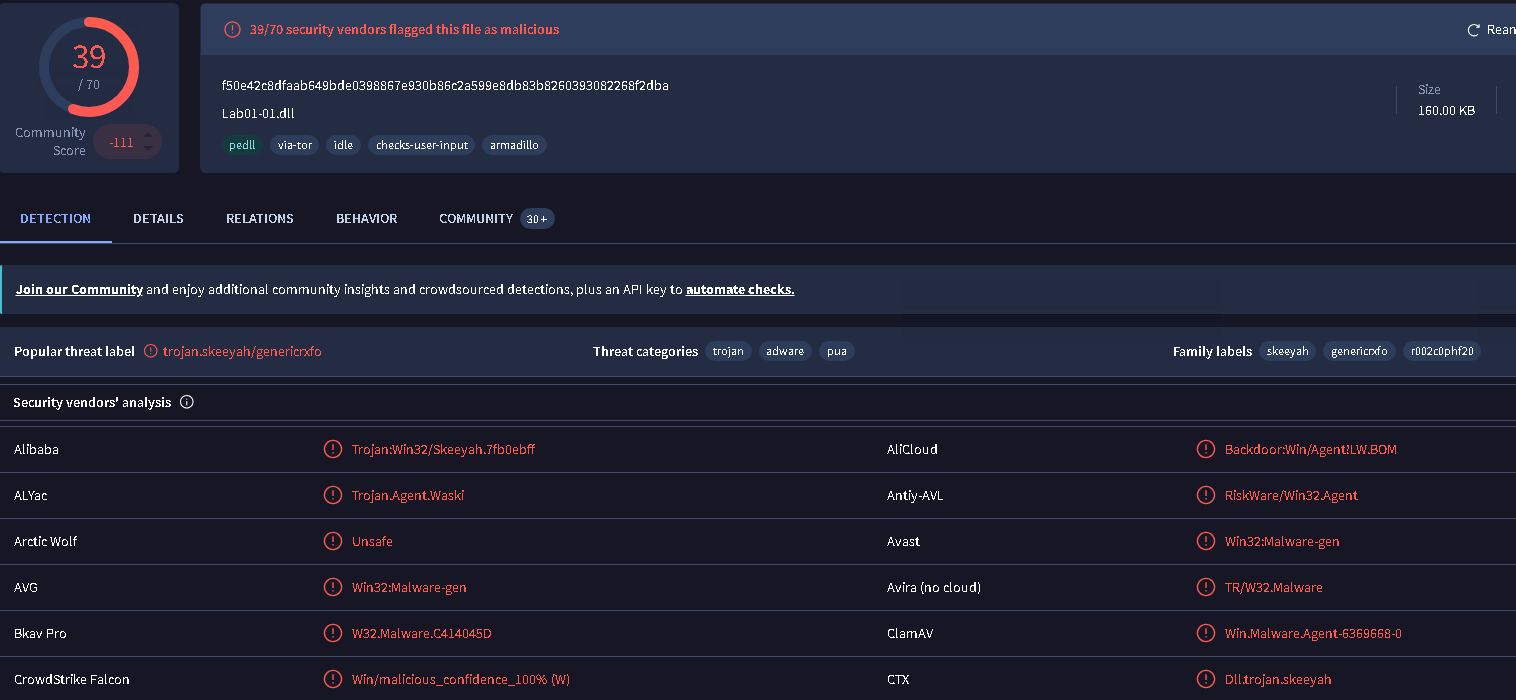
Popular signatures that was found under lab1-1.dll was: skeeyah, trojan, adware, genericrxfo.
Question 2: When were these files compiled?
To find this answer, I would have to load up both lab1-1.dll and lab1-1.exe into PE-bear and navigate under the PE header -> NT Header -> File Header and look under the Time&Date Compiled field.
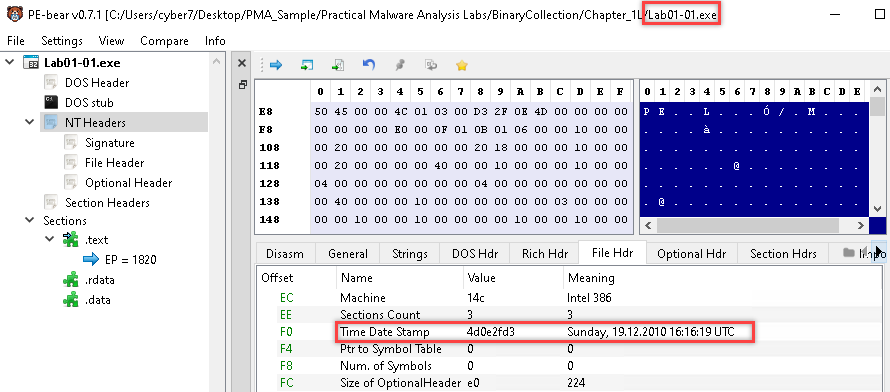
As we can see in the picture above, that program (Lab01-01.exe) was compiled on 12/19/2010 at 16:16 UTC.
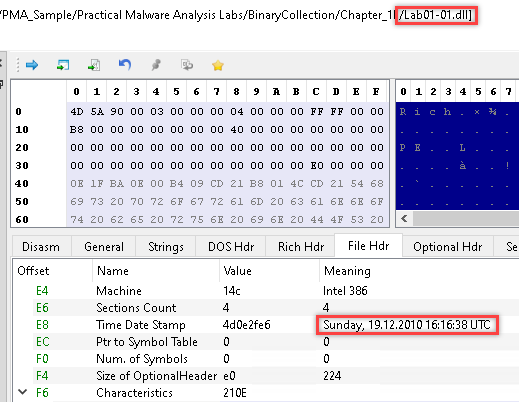
Same applies for Lab01-01.dll. Time Date Stamp is 12/19/2010 at 16:16 UTC.
Question 3: Are there any indication that either of these files is packed or obfuscated? If so, what are the indicators?
You can check out my post on "Packed Files" if you're not familiar with Packed files.
 Nguyen Nguyen
Is it packed? Analysis of Lab01-01.exe
Method 1: Checking the Strings
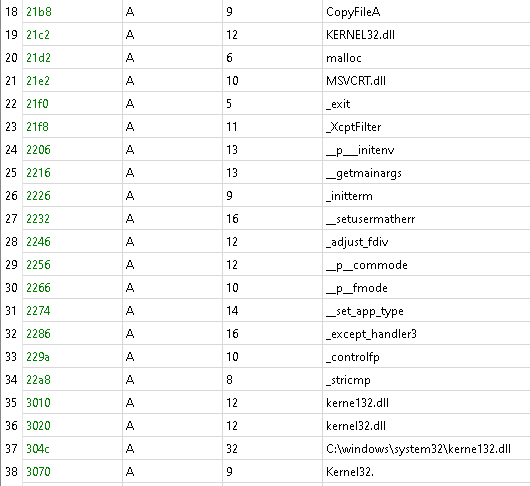
As you can see from the screenshot above, there is an total of 41 strings inside this executable.
Looking at the strings, we can see that there are multiple of Windows Functions "potentially" being used.
Example:
- CreateFileA
- CreateFileMappingA
- CopyFileA
- etc..
We also see from the strings that the application is potentially borrowing functions from multiple DLLs: MSVCRT.dll, kerne132.dll <- Typo: suspicious, kernel32.dll, and lab01-01.dll.
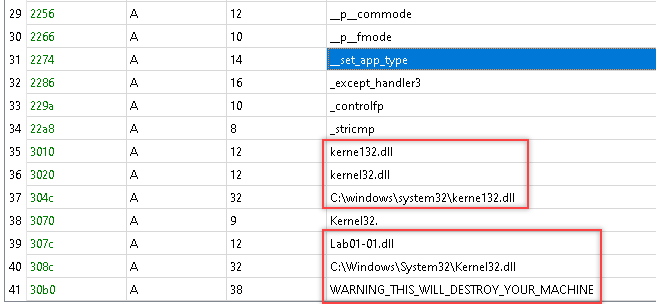
Additionally, there are file paths to the DLLs and let's not forget the "WARNING_THIS_WILL_DESTROY_YOUR_MACHINE" text.

Method 2: Checking the Imports
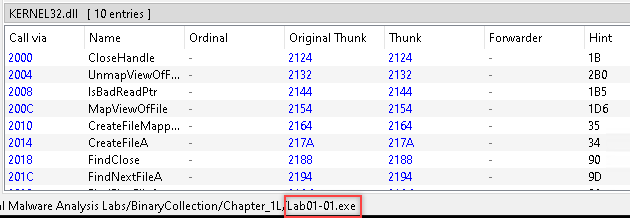
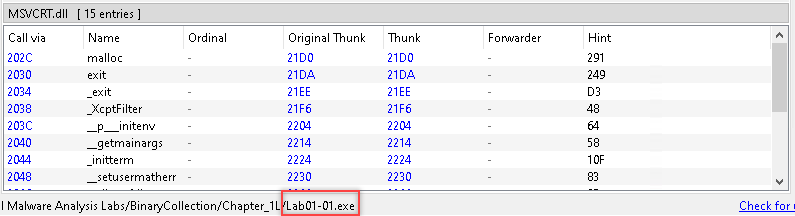
Looking at the picture above, Lab01-01.exe is using 10 functions from Kernel32.dll and 15 functions from MSVCRT.dll. It's pretty cool that PE bear provides an list of what functions are being used within the program for that specific DLL.
Method 3: Checking for random section name
None spotted here.

As far from what I'm seeing, there no indication that lab01-01.exe is packed. Due to:
- Numerous strings being found
- No weird section names.
- Lots of imported functions.
Is it packed? Analysis of Lab01-01.dll
Same process as Lab01-01.exe.
Method 1: Checking the Strings
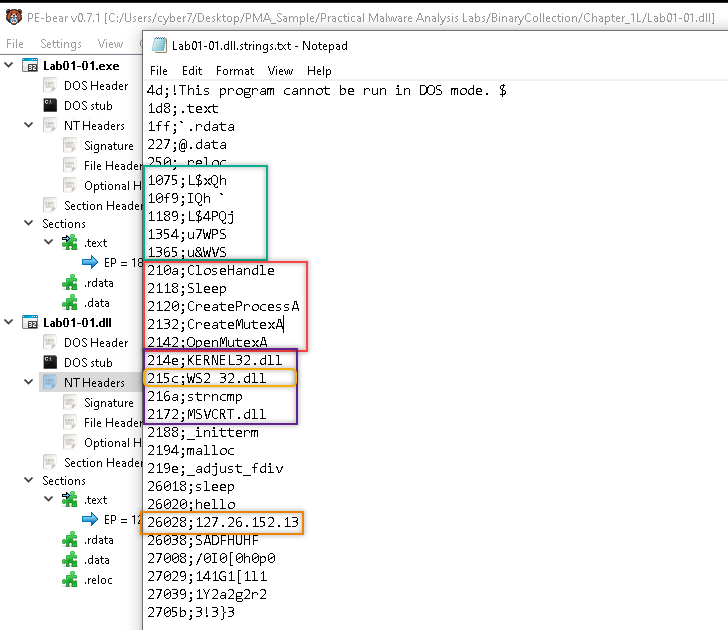
Based on the numbers of strings, and the data (IP address, Win API) from the strings, I wouldn't say that this DLL file is packed.
Method 2: Checking the Imports
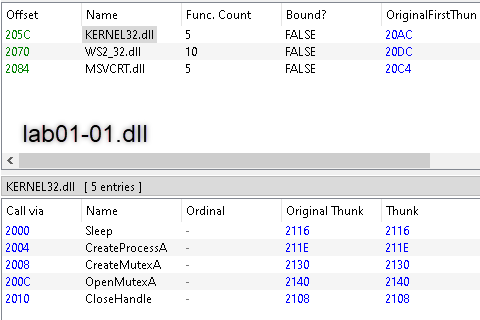
Currently, lab01-01.dll is importing from three DLLs (Kernel32.dll, WS2_32.dll, and MSVCRT.dll) and using an total of 20 functions. Based on those information, I would say that the .dll is not packed - An packed DLL would use less functions.
Method 3: Checking for weird section names
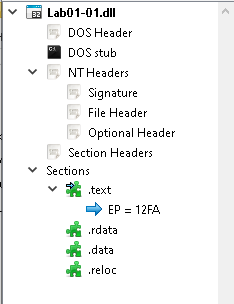
Nothing particular stand out.
Overall:
Based on method 1 and method 2, I can conclude that Lab01-01.dll is not packed.
Question 4: Do any imports hint at what this malware does? If so, which imports are they?
For this question, we will use the strings and imports as clues to help usdetermine the functionality of the application.
Lab01-01.exe functionality
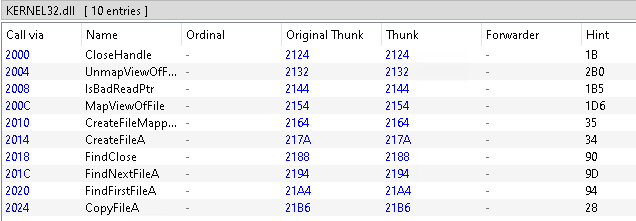
Starting at Kernel32.dll, we can determine that the program have functionality to copy files (CopyFileA) and create file (CreateFileA). Additionally, the program has the ability to find multiples of files.
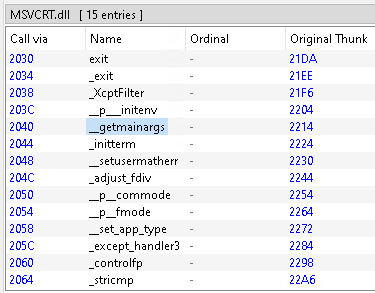
Moving to Msvcrt.dll, I don't see any Windows functions being used. Majority of these name are C++/C functions. As of July 21, 2026, I don't see anything that is a red flag for me.
Lab01-01.dll functionality
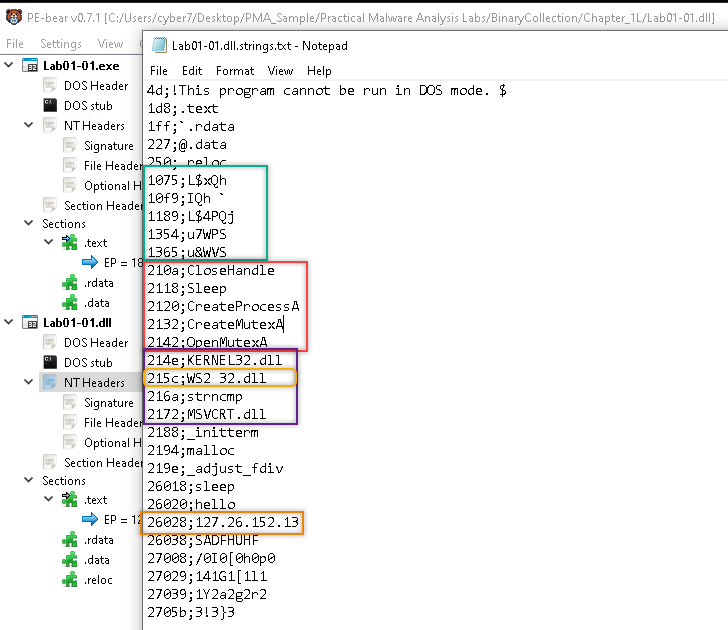
Referencing the image above, we see that the text inside the green square could be obfuscation OR random memory address. Inside the orange square contains the Windows functions, and looking at the functions individually, we see that the DLL can provide the program the ability to create an process (CreateProcessA) and the ability to be inactive/wait (Sleep) until the conditions are met to trigger which allows the program to be stealthy.
Additionally, I looked into the functionality of WS2_32.dll and from my understanding, the DLL provides the program functionality to handle network communications. This closely ties into the IP address (127[.]26[.]152[.]13).
Question 5: Are there any other files or host-based indicators that you could look for on infected systems?
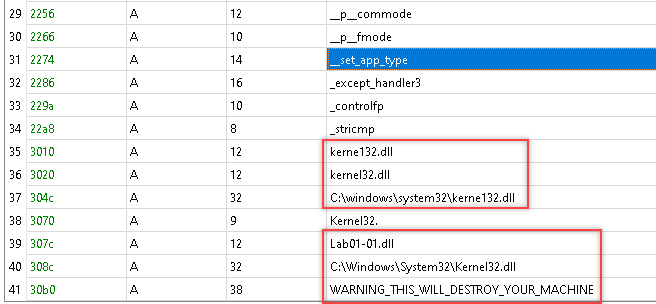
As shown above, one of host-based indicator that I can think of was in the application (lab01-01.exe) where there was a typo for kernel32.dll.
- Correct spelling: kernel32.dll
- Incorrect spelling: kerne132.dll # 1 was a replacement for l
Question 6: What network-based indicators could be used to find this malware on infected machines?
The network-based indicators: 127[.]26[.]152[.]13. Please refer to question 4, Lab01-01.dll functionality if you want see a visual.
Question 7: What would you guess is the purpose of these files?
I would guess that purpose of kernel132.dll was to replace the actual kernel32.dll and used it to radio back to the C2 (127[.]26[.]152[.]13) once or so often - sleep allows it to blend in with normal traffic. Overall, the DLL is used to serve as an backdoor.
Additionally, I would guess that the main job of kernel32.exe is to create the DLL and place it within C:\Windows\System32\ file path.
Reflecting on my answer (Optional)
Some things I missed:
- Lab01-01.dll didn't have any export any functions which is uncommon for DLLs. Based on that information, we can guess that the .dll file wasn't used to provide functionality to the program.
- I forgot WS2_32.dll was importing functions by using Ordinal numbers and not function names. I could've used dependency walker to match the ordinal number with the functions.
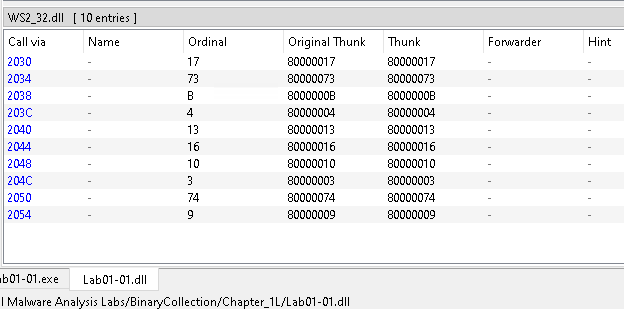
Function (Ordinal Number)
recvfrom (17): Used in network programming to receive incoming data on a socket.
WSAGetServiceClassNameByClassIdW(73): map a generic, machine-readable service class ID to a human-readable service name (e.g., "FTP" or "HTTP").
inet_addr (11): C/C++ function used in network socket programming to convert a human-readable IPv4 string (like "192[.]168[.]1[.]1") into a binary integer format suitable for network transmission (specifically, network byte order).
connect (4): establishes a connection to a specific network endpoint (IP address and port) for a given socket. It is primarily used on the client side, requiring a socket that has already been successfully initialized and created via WSAStartup and socket().
listen (13): places a socket in a state in which it is listening for an incoming connection.
recv (16): The recv function in the Windows Sockets API (Winsock) isused to read incoming data from a connected socket or a bound connectionless socket.
ioctlsocket (10): used to set or retrieve operating parameters for a socket, regardless of its connection state or protocol.
closesocket(3): Terminate an active network connection and free up the system resources and memory allocated to a socket.
WSAHtonl (74)
htons(9): htons (Host TO Network Short) is used to convert a 16-bit port number from your computer's native host byte order(e.g., little-endian on Intel/AMD) into network byte order
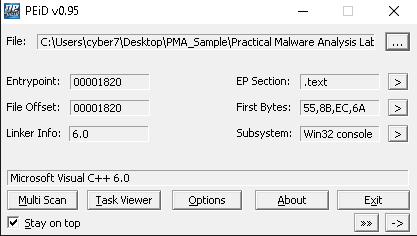
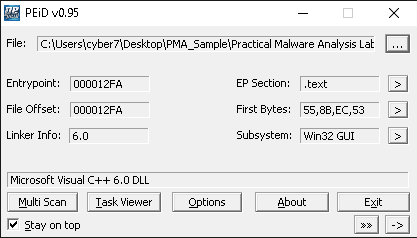
- I could've used the PEid to detect if any packer was used.